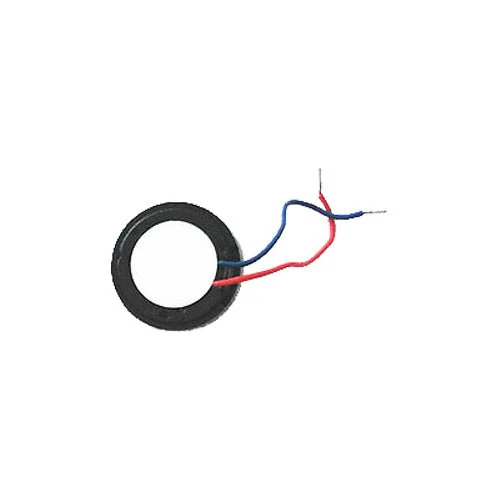
ZedLabz replacement vibration motor for Nintendo Wii remote wireless controller
Features:
- Replacement internal vibration motor for Wii remote wireless controller.
- Can repair problems with rumble vibration feedback not working.
- Require internal fitting - Controller must be opened to replace the speaker.
- Soldering required for positive and negative wires.
- Tri-wing Y0 screwdriver is required to open controller (not included).
Description:
If your Wii remote is no longer vibrating when expected during gameplay you may need to replace the motor that powers the rumble vibration.
It is worth checking the software settings before concluding the motor needs to be replaced (see below for instructions).
The Wii vibration motor requires internal fitting and soldering.
It mounts under the B button, two wires need to be soldered to the controller motherboard, the wires are through hole mounted.
Opening the controller will void your warranty.
A tri-wing Y0 screwdriver is required to open the Wii remote (not included).
Testing your wii remote for software issues before repair:
1 - To check your Wii remote settings first ensure the batteries are good and have plenty of power left in them.
2 - Navigate to the Wii Remote settings via the Home menu and verify that the rumble feature is turned "on."
3 - Go to the Wii Menu and point at the Wii button on the bottom left corner of the screen.
4 - A slight vibration should be left, if the Wii Remote doesn't vibrate, there is likely a problem with the Wii Remote, and it will need to be opened in order to repair or replace the rumble vibration motor.
- Replacement internal vibration motor for Wii remote wireless controller.
- Can repair problems with rumble vibration feedback not working.
- Require internal fitting - Controller must be opened to replace the speaker.
- Soldering required for positive and negative wires.
- Tri-wing Y0 screwdriver is required to open controller (not included).
Description:
If your Wii remote is no longer vibrating when expected during gameplay you may need to replace the motor that powers the rumble vibration.
It is worth checking the software settings before concluding the motor needs to be replaced (see below for instructions).
The Wii vibration motor requires internal fitting and soldering.
It mounts under the B button, two wires need to be soldered to the controller motherboard, the wires are through hole mounted.
Opening the controller will void your warranty.
A tri-wing Y0 screwdriver is required to open the Wii remote (not included).
Testing your wii remote for software issues before repair:
1 - To check your Wii remote settings first ensure the batteries are good and have plenty of power left in them.
2 - Navigate to the Wii Remote settings via the Home menu and verify that the rumble feature is turned "on."
3 - Go to the Wii Menu and point at the Wii button on the bottom left corner of the screen.
4 - A slight vibration should be left, if the Wii Remote doesn't vibrate, there is likely a problem with the Wii Remote, and it will need to be opened in order to repair or replace the rumble vibration motor.
$6.01
Original: $20.02
-70%ZedLabz replacement vibration motor for Nintendo Wii remote wireless controller—
$20.02
$6.01ZedLabz replacement vibration motor for Nintendo Wii remote wireless controller
Features:
- Replacement internal vibration motor for Wii remote wireless controller.
- Can repair problems with rumble vibration feedback not working.
- Require internal fitting - Controller must be opened to replace the speaker.
- Soldering required for positive and negative wires.
- Tri-wing Y0 screwdriver is required to open controller (not included).
Description:
If your Wii remote is no longer vibrating when expected during gameplay you may need to replace the motor that powers the rumble vibration.
It is worth checking the software settings before concluding the motor needs to be replaced (see below for instructions).
The Wii vibration motor requires internal fitting and soldering.
It mounts under the B button, two wires need to be soldered to the controller motherboard, the wires are through hole mounted.
Opening the controller will void your warranty.
A tri-wing Y0 screwdriver is required to open the Wii remote (not included).
Testing your wii remote for software issues before repair:
1 - To check your Wii remote settings first ensure the batteries are good and have plenty of power left in them.
2 - Navigate to the Wii Remote settings via the Home menu and verify that the rumble feature is turned "on."
3 - Go to the Wii Menu and point at the Wii button on the bottom left corner of the screen.
4 - A slight vibration should be left, if the Wii Remote doesn't vibrate, there is likely a problem with the Wii Remote, and it will need to be opened in order to repair or replace the rumble vibration motor.
- Replacement internal vibration motor for Wii remote wireless controller.
- Can repair problems with rumble vibration feedback not working.
- Require internal fitting - Controller must be opened to replace the speaker.
- Soldering required for positive and negative wires.
- Tri-wing Y0 screwdriver is required to open controller (not included).
Description:
If your Wii remote is no longer vibrating when expected during gameplay you may need to replace the motor that powers the rumble vibration.
It is worth checking the software settings before concluding the motor needs to be replaced (see below for instructions).
The Wii vibration motor requires internal fitting and soldering.
It mounts under the B button, two wires need to be soldered to the controller motherboard, the wires are through hole mounted.
Opening the controller will void your warranty.
A tri-wing Y0 screwdriver is required to open the Wii remote (not included).
Testing your wii remote for software issues before repair:
1 - To check your Wii remote settings first ensure the batteries are good and have plenty of power left in them.
2 - Navigate to the Wii Remote settings via the Home menu and verify that the rumble feature is turned "on."
3 - Go to the Wii Menu and point at the Wii button on the bottom left corner of the screen.
4 - A slight vibration should be left, if the Wii Remote doesn't vibrate, there is likely a problem with the Wii Remote, and it will need to be opened in order to repair or replace the rumble vibration motor.
Product Information
Product Information
Shipping & Returns
Shipping & Returns
Description
Features:
- Replacement internal vibration motor for Wii remote wireless controller.
- Can repair problems with rumble vibration feedback not working.
- Require internal fitting - Controller must be opened to replace the speaker.
- Soldering required for positive and negative wires.
- Tri-wing Y0 screwdriver is required to open controller (not included).
Description:
If your Wii remote is no longer vibrating when expected during gameplay you may need to replace the motor that powers the rumble vibration.
It is worth checking the software settings before concluding the motor needs to be replaced (see below for instructions).
The Wii vibration motor requires internal fitting and soldering.
It mounts under the B button, two wires need to be soldered to the controller motherboard, the wires are through hole mounted.
Opening the controller will void your warranty.
A tri-wing Y0 screwdriver is required to open the Wii remote (not included).
Testing your wii remote for software issues before repair:
1 - To check your Wii remote settings first ensure the batteries are good and have plenty of power left in them.
2 - Navigate to the Wii Remote settings via the Home menu and verify that the rumble feature is turned "on."
3 - Go to the Wii Menu and point at the Wii button on the bottom left corner of the screen.
4 - A slight vibration should be left, if the Wii Remote doesn't vibrate, there is likely a problem with the Wii Remote, and it will need to be opened in order to repair or replace the rumble vibration motor.
- Replacement internal vibration motor for Wii remote wireless controller.
- Can repair problems with rumble vibration feedback not working.
- Require internal fitting - Controller must be opened to replace the speaker.
- Soldering required for positive and negative wires.
- Tri-wing Y0 screwdriver is required to open controller (not included).
Description:
If your Wii remote is no longer vibrating when expected during gameplay you may need to replace the motor that powers the rumble vibration.
It is worth checking the software settings before concluding the motor needs to be replaced (see below for instructions).
The Wii vibration motor requires internal fitting and soldering.
It mounts under the B button, two wires need to be soldered to the controller motherboard, the wires are through hole mounted.
Opening the controller will void your warranty.
A tri-wing Y0 screwdriver is required to open the Wii remote (not included).
Testing your wii remote for software issues before repair:
1 - To check your Wii remote settings first ensure the batteries are good and have plenty of power left in them.
2 - Navigate to the Wii Remote settings via the Home menu and verify that the rumble feature is turned "on."
3 - Go to the Wii Menu and point at the Wii button on the bottom left corner of the screen.
4 - A slight vibration should be left, if the Wii Remote doesn't vibrate, there is likely a problem with the Wii Remote, and it will need to be opened in order to repair or replace the rumble vibration motor.